• Home
  • About us
  • Contact
  • Skip to primary navigation
  • Skip to main content
  • Skip to primary sidebar

Welcome to www.DoitFixit.com

www.doitfixit.com

  • Microsoft
  • Fortinet
  • Symantec
  • Office 365
  • Azure
  • Others
  • Show Search
Hide Search

NetVault 10 SQL Restore Job Not Completing

October 24, 2015 By Damitha Anuradha Leave a Comment

When you do a SQL restore job in NetVault 10 it will running without completing. The log will display below lines without any error message.

2015/10/22 10:37:58 63 1 Media NETVAULTBK-SVR (VTL LIBRARY) Media in 'DRIVE 5:NETVAULTBK-SVR' assigned to job ready for data transfer
2015/10/22 10:37:58 63 1 Media NETVAULTBK-SVR (VTL LIBRARY) Job has been assigned media 'SQL_MEDIA' (PSYDD004) in 'DRIVE 5:NETVAULTBK-SVR'
2015/10/22 10:37:58 63 1 Data Plugin SLSB-DB-01 Restoring database 'Lease'
2015/10/22 10:37:57 63 1 Data Plugin SLSB-DB-01 Restoring Server: <SQL-Server-Name>\DB-Name
2015/10/22 10:37:57 63 1 Jobs NETVAULTBK-SVR Starting job 63 '001' (Phase 1 , Instance 1) for UID 1

To fix this issue log in to your SQL Management and go to relevant database.
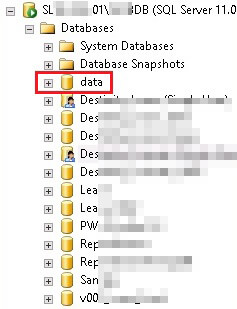
NetVault SQL Restore Error www.doitfixit.com (1)

Right click the database and go to properties. In the Options, at the bottom, Restrict Access option is set to MULTI_USER. Change it to SINGLE_USER. Then restore the database.

NetVault SQL Restore Error www.doitfixit.com (2)

After the restore, the Restrict Access will be changed back to MULTI_USER. Double check to be sure. If not change to MULTI_USER.

Reader Interactions

Leave a Reply Cancel reply

Your email address will not be published. Required fields are marked *

Primary Sidebar

Recent Posts

  • Fixing the “A user with this name already exists. Use a different name.” Error in Microsoft 365
  • Veeam Backup – Failed to prepare guests for volume snapshot
  • How to Configure/Integrate FortiClient EMS with FortiAnalyzer
  • Backup Hyper-V Virtual Machines with Pass-Through Disks
  • Slow Network Speed with Hyper-V Virtual Machines on Windows Server Server 2019
  • Block MS Exchange Server OWA access from Internet
  • Error 1168 – The specified product key could not be validated.
  • Unable to Enable Desktop Icons after Joining to the Domain
  • Veritas BackupExec – A backup set was created which contains no data 0xe00084b7
  • Download Offline Address Book – Unexpected Error has occurred