• Home
  • About us
  • Contact
  • Skip to primary navigation
  • Skip to main content
  • Skip to primary sidebar

Welcome to www.DoitFixit.com

www.doitfixit.com

  • Microsoft
  • Fortinet
  • Symantec
  • Office 365
  • Azure
  • Others
  • Show Search
Hide Search

How to enable Modem Interface on FortiGate

February 25, 2014 By Damitha Anuradha Leave a Comment

To enable Modem Interface on FortiGate unit run below command on CLI. config system modemset status enableend Now log off, log back in and check on the interfaces. … [Read more...] about How to enable Modem Interface on FortiGate

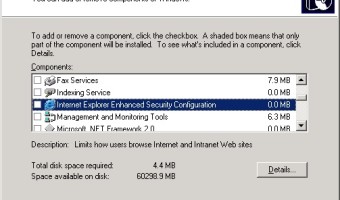
Disable IE Enhanced Security Configuration on Server 2003
February 25, 2014 By Damitha Anuradha Leave a Comment

To disable Internet Explorer Enhanced Security Configuration open Add or remove windows component from Server 2003 control panel and remove "Internet Explorer Enhanced Security Configuration" feature. … [Read more...] about Disable IE Enhanced Security Configuration on Server 2003

Remove “Test Mode” on Windows

February 24, 2014 By Damitha Anuradha Leave a Comment

How to disable the "Test mode" message that is displayed in Windows.. You receive the following message in the lower-right corner of the desktop, depending on your version of Windows. Test ModeWindows 8.1 EnterpriseBuild 9600 To fix this problem in Windows 8, follow below steps: … [Read more...] about Remove “Test Mode” on Windows

Eset Remote Administrator Server 5 Configuration Guide – Part I

February 11, 2014 By Damitha Anuradha Leave a Comment

Download ESET Remote Administrator and ESET Remote Administrator Console. http://www.eset.com/int/download/business/ Let's start ESET Remote Administrator Server installation. Click Next Choose your ESET license key file. Choose the server database type. Specify … [Read more...] about Eset Remote Administrator Server 5 Configuration Guide – Part I

FortiGate LDAP Server Configuration for Active Directory

February 11, 2014 By Damitha Anuradha Leave a Comment

Before proceed to the next step log on to Active Directory Users and Computers snap in and create a user for FortiGate authentication. My FortiGate Authentication user details as follow. Name: Fortinet AgentUser Logon Name: fortinet To configure LDAP Server authentication on your … [Read more...] about FortiGate LDAP Server Configuration for Active Directory

  • « Go to Previous Page
  • Go to page 1
  • Interim pages omitted …
  • Go to page 12
  • Go to page 13
  • Go to page 14
  • Go to page 15
  • Go to page 16
  • Interim pages omitted …
  • Go to page 36
  • Go to Next Page »

Primary Sidebar

Recent Posts

  • Fixing the “A user with this name already exists. Use a different name.” Error in Microsoft 365
  • Veeam Backup – Failed to prepare guests for volume snapshot
  • How to Configure/Integrate FortiClient EMS with FortiAnalyzer
  • Backup Hyper-V Virtual Machines with Pass-Through Disks
  • Slow Network Speed with Hyper-V Virtual Machines on Windows Server Server 2019
  • Block MS Exchange Server OWA access from Internet
  • Error 1168 – The specified product key could not be validated.
  • Unable to Enable Desktop Icons after Joining to the Domain
  • Veritas BackupExec – A backup set was created which contains no data 0xe00084b7
  • Download Offline Address Book – Unexpected Error has occurred

Deprecated: genesis_footer_creds_text is deprecated since version 3.1.0! Use genesis_pre_get_option_footer_text instead. This filter is no longer supported. You can now modify your footer text using the Theme Settings. in /home/wwwdoitf/public_html/wp-includes/functions.php on line 5238