• Home
  • About us
  • Contact
  • Skip to primary navigation
  • Skip to main content
  • Skip to primary sidebar

Welcome to www.DoitFixit.com

www.doitfixit.com

  • Microsoft
  • Fortinet
  • Symantec
  • Office 365
  • Azure
  • Others
  • Show Search
Hide Search

Active Directory – Who reset the Password?

December 5, 2016 By Damitha Anuradha Leave a Comment

For achieve this first we have to enable audit account success and failures through Group Policy Management Editor.

Edit existing Group policy or create new Group Policy, Go to Computer Configuration -> Policies -> Windows Settings -> Security Settings -> Local Policies -> Audit Policy

Enable the settings

who-reset-the-password_www-doitfixit-com_1

After applying the Group policy all the events will be starting to log and can view through Event Log Viewer. We can create a Custom View to filter those events as below.
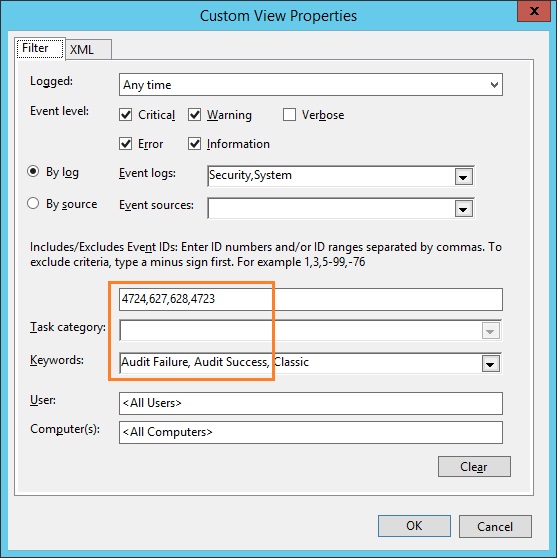
Who reset the active directory user password

Event ID 627 – Change Password Attempt

Event ID 628 – User Account Password Set

Event ID 4724 – An attempt was made to reset an account’s password

Event ID 4723 – An attempt was made to change an account’s password

who-reset-the-password_www-doitfixit-com


Reader Interactions

Leave a Reply Cancel reply

Your email address will not be published. Required fields are marked *

Primary Sidebar

Recent Posts

  • Fixing the “A user with this name already exists. Use a different name.” Error in Microsoft 365
  • Veeam Backup – Failed to prepare guests for volume snapshot
  • How to Configure/Integrate FortiClient EMS with FortiAnalyzer
  • Backup Hyper-V Virtual Machines with Pass-Through Disks
  • Slow Network Speed with Hyper-V Virtual Machines on Windows Server Server 2019
  • Block MS Exchange Server OWA access from Internet
  • Error 1168 – The specified product key could not be validated.
  • Unable to Enable Desktop Icons after Joining to the Domain
  • Veritas BackupExec – A backup set was created which contains no data 0xe00084b7
  • Download Offline Address Book – Unexpected Error has occurred

Deprecated: genesis_footer_creds_text is deprecated since version 3.1.0! Use genesis_pre_get_option_footer_text instead. This filter is no longer supported. You can now modify your footer text using the Theme Settings. in /home/wwwdoitf/public_html/wp-includes/functions.php on line 5238