- Go to Active Directory Users & Computers
- Under “Active Directory Users & Computers“ right click “Saved Queries” click “New”, “Query”

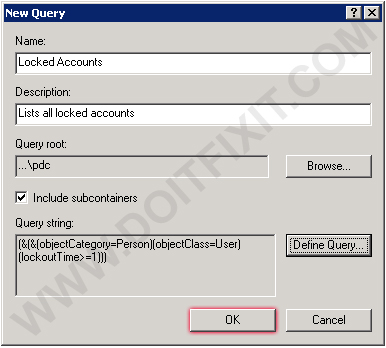
- Enter a Name and description for the query. Click “Define Query…”.

- In the “Find” drop down list, select Custom Search.
- Click on the “Advanced” tab
- In the Enter LDAP query type the following query:
(objectCategory=Person)(objectClass=User)(lockoutTime>=1)

- Click OK
- Press F5 or refresh on the query window
Now it should query all of your Locked Accounts.

Leave a Reply